
Since the Power Automates were announced and their use democratized, especially with the concept of citizen developer, they are now an integral part of our daily developer/customizer life. As it is now strongly recommended to use Flows rather than classic Workflows (Dataverse), it is imperative to be familiar with them!
As we know, there are many Trigger for these Flows (Scheduled, Automated, Instant…) and depending on how they are used and how they are implemented, we can’t necessarily monitor their execution. I mean, it’s not the goal, the principle is to implement an automation of a business process.
There are, however, some ways to get an overview of the health of flows and executions like the Power Platform admin center which is designed to help the administrators and IT professionals and allows us to monitor the use and adoption of the platform and its components across the enterprise including Power Automate! Note that there is also the famous Centre of Excellence that can be used for this.
Error Handling
As you’ve all already experienced, in life things don’t go exactly as you expect and it’s the same when we’re working with Flow! But that doesn’t mean that we can’t act preventively, and this is when we start talking about error management!
In a Flow’s context, there are two particularly important notions to know to be able to tackle this type of problem:
- Run After
- Scope Control
Configure Run After
The “Configure Run After” is clearly not a new feature but on all the projects I have seen over the last two years it is rare to see them used! Initially, this notion was announced in 2017 by Stephen Siciliano.
The aim will be to be able to define actions in case an action is not executed correctly and causes an error. This will allow us to make sure that the most important actions of this flow will be executed or that we will be able to execute other actions following the failure of the latter!
Let’s imagine that we are going to implement a basic Flow which aims to retrieve a record and then update it. In case the record could not be recovered the update action will not be executed:
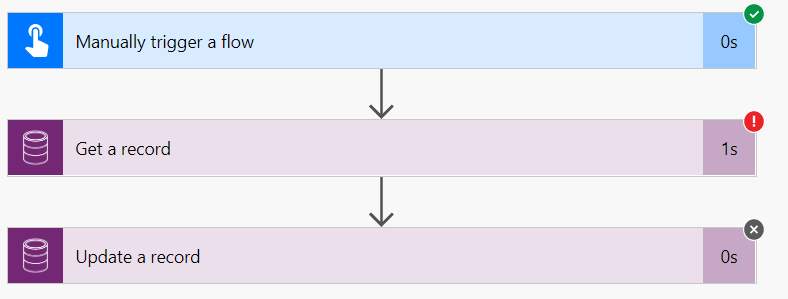
In this case, I simply tried to retrieve an account with a correct ID (GUID) but it did not return any result and I got the error “account With Id = 167498e6-ff21-47bf-8c18-26fa2b6cba77 Does Not Exist”:
{
  "error": {
    "code": "0x80040217",
    "message": "account With Id = 167498e6-ff21-47bf-8c18-26fa2b6cba77 Does Not Exist",
    "@Microsoft.PowerApps.CDS.ErrorDetails.ApiExceptionSourceKey": "Plugin/Microsoft.Crm.Common.ObjectModel.AccountService",
    "@Microsoft.PowerApps.CDS.ErrorDetails.ApiStepKey": "81cbbb1b-ea3e-db11-86a7-000a3a5473e8",
    "@Microsoft.PowerApps.CDS.ErrorDetails.ApiDepthKey": "1",
    "@Microsoft.PowerApps.CDS.ErrorDetails.ApiActivityIdKey": "6b816a96-f6d9-472c-843f-47446737fa83",
    "@Microsoft.PowerApps.CDS.ErrorDetails.ApiPluginSolutionNameKey": "System",
    "@Microsoft.PowerApps.CDS.ErrorDetails.ApiStepSolutionNameKey": "System",
    "@Microsoft.PowerApps.CDS.ErrorDetails.ApiExceptionCategory": "ClientError",
    "@Microsoft.PowerApps.CDS.ErrorDetails.ApiExceptionMesageName": "ObjectDoesNotExist",
    "@Microsoft.PowerApps.CDS.ErrorDetails.ApiExceptionHttpStatusCode": "404",
    "@Microsoft.PowerApps.CDS.HelpLink": "http://go.microsoft.com/fwlink/?LinkID=398563&error=Microsoft.Crm.CrmException%3a80040217&client=platform",
    "@Microsoft.PowerApps.CDS.InnerError.Message": "account With Id = 167498e6-ff21-47bf-8c18-26fa2b6cba77 Does Not Exist"
  }
}
We could also insert an incorrect GUID in its format which therefore also implies a failure of the action but with a different error:
{
  "error": {
    "code": "0x8006088a",
    "message": "Bad Request - Error in query syntax."
  }
}
The goal is now to execute an action if the action fails. We could notify the user, an administrator or simply create a log in a table defined for this purpose.
So the first step is to add a “Parallel Branch:
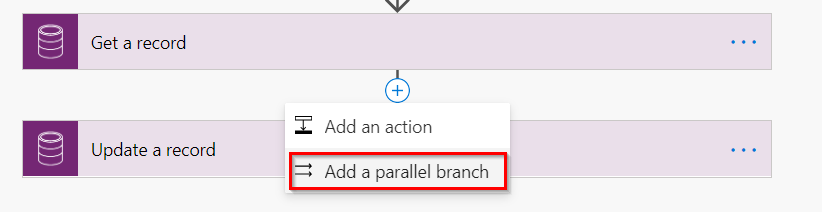
After selecting the desired action, we now have two parallel actions that will be executed after the first one. In our case, we will warn a user if the “Get a Record” action fails.
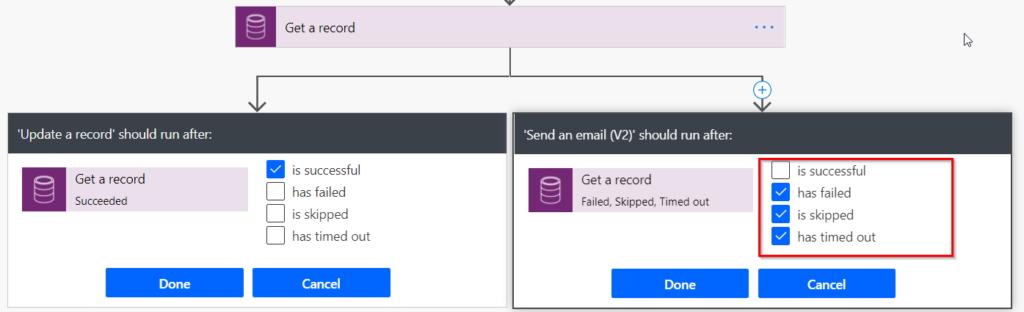
It is necessary to specify that the action “Send an e-mail” should be executed if the previous one fails and the action “Update a record” should only be executed if we were able to retrieve the record.
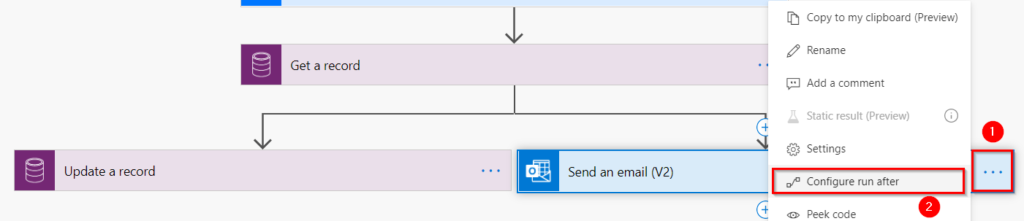

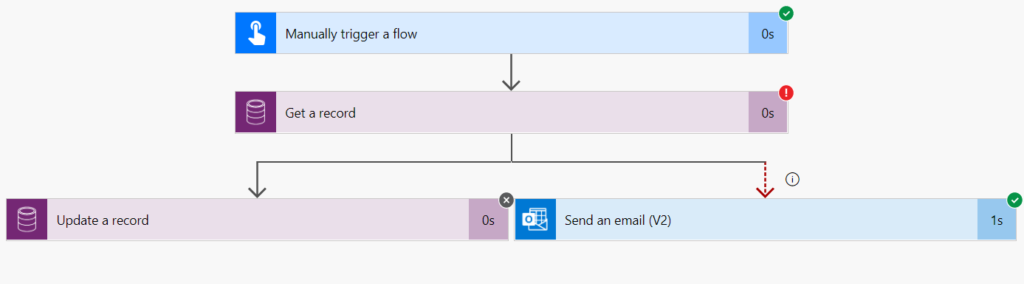
Now we just have to check the correct execution of the Flow:
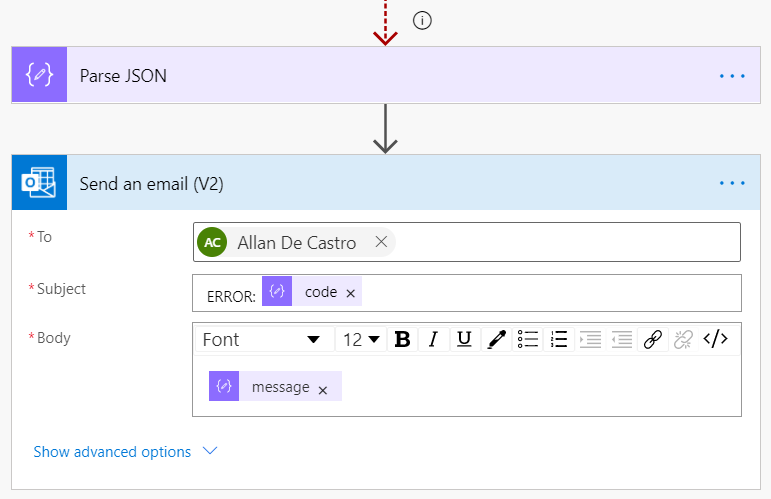
To go a little further, we saw that we could have two different errors and the returned content is a basic JSON ODATA object.
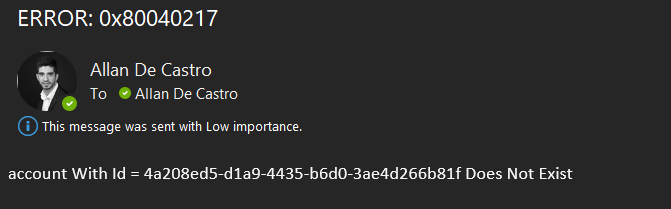
So we can easily add a parsing step which would allow us to send a mail depending on the error (code in the message).
Here are the different explanations of the possible configurations for “Run After”:
- Has failed: An action has any type of failure (except timeout).
- Is Skipped: When a condition is not met, or, when a previous action before that action fails.
- Has Timed Out: This can happen if the call to the backend times out (120 seconds), or for long term actions such as approvals, after 30 days.
Use Scope Control Action
When it comes to making Flows of a certain complexity or that will contain a consistent number of actions it will be complicated to create actions configured as “Run After” for each action of the process.
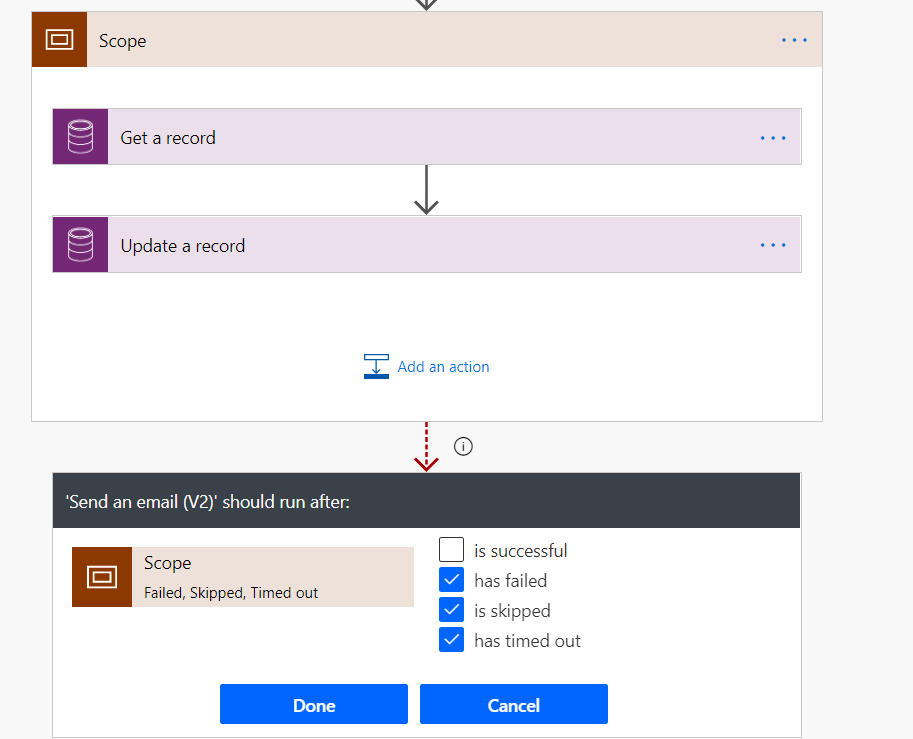
It is at this stage that the notion of “Scope” is useful, it will allow us to encompass several actions and it will act as if it is only one action, i.e. it will reflect its content!
If an action fails, then the block fails for the same reason as the failed action.
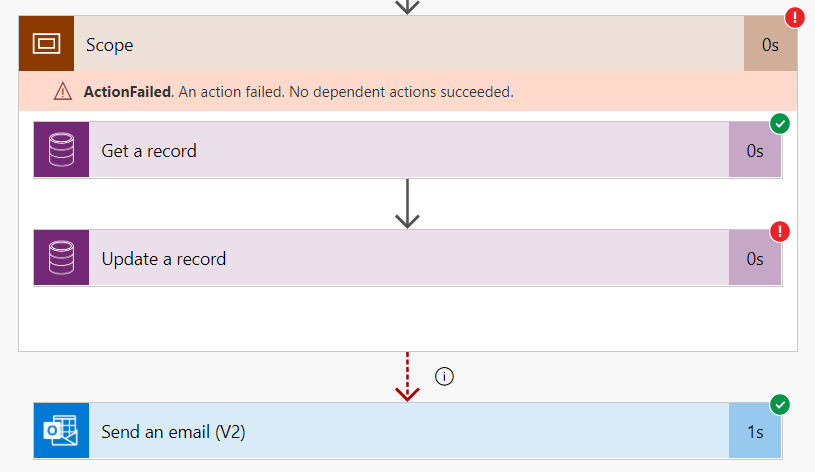
In this scenario we will therefore add our two actions succinctly and make sure that the second one fails while keeping the email with the same “Run After” configuration.
Once the execution has launched, you can see that the email has been sent!
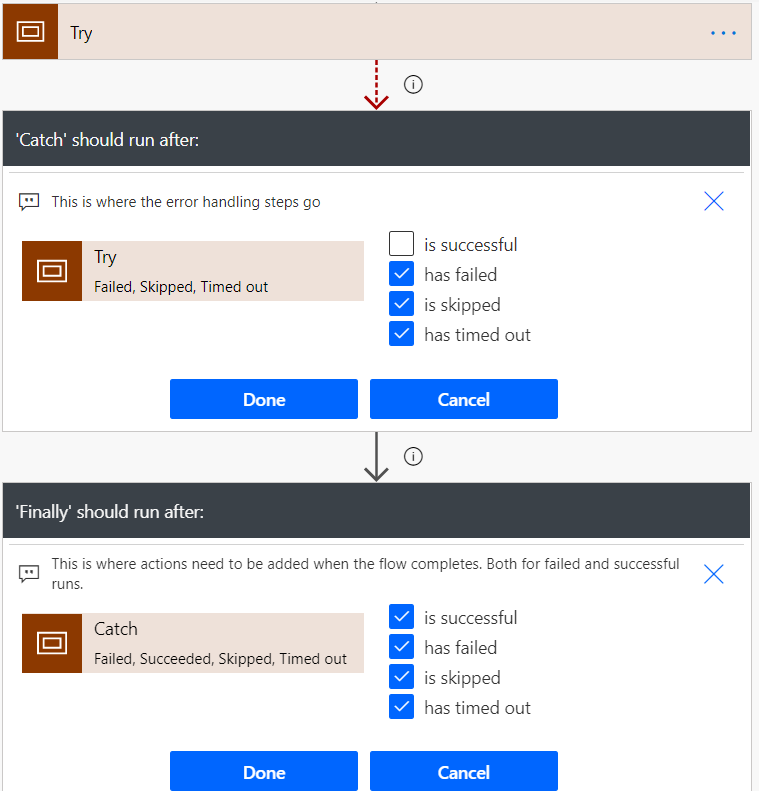
Now if we want a real error handling pattern just use the “Scope” action to do a try-catch-finally!
For information, when you try to add a “Initialize Variable” action within a scope : "Note that you will not be able to initialise a variable in a Scope because it must first be implemented!"




Comments (8)
Error handling model in Power Automate - 365 Communitysays:
December 5, 2020 at 3:59 PM[…] Error handling model in Power Automate […]
Manishsays:
October 19, 2021 at 2:42 PMHi Allan,
Thanks for wonderful post . I have a flow where I am using nested action and one of the action failing , Can you please explain how to capture nested action failure message.
Thanks
Allan De Castrosays:
October 19, 2021 at 7:23 PMHi Manish,
Thank you very much for your comment and your interest in my blog 🙂
I guess you have for example an “Apply To Each” loop which includes other actions like sending an email etc.
Even though I use scope control globally in my blog post, you can also use it in a loop and thus catch a specific error from a specific action!
Dataverse: Power Automate vs Plug-ins – Allan De Castro's Power Platform Notebooksays:
February 10, 2022 at 11:44 PM[…] using CoE) or fine-tune error management by implementing specific patterns via the Scope control: Error handling model in Power Automate. You can also check this blog post to Get notifications when flows fail using Power […]
Jojosays:
October 24, 2022 at 1:06 PMHi Allan,
Can you show the schema for the JSON Parse error.
Thanks.
Allan De Castrosays:
October 31, 2022 at 8:13 PMHello Jojo,
If I remeber correctly, the schema was this one (based on Dataverse API, see https://learn.microsoft.com/en-us/power-apps/developer/data-platform/webapi/compose-http-requests-handle-errors?WT.mc_id=5004279#parse-errors-from-the-response):
{

    "error": {

        "code": "0x80040265",

        "message": "Example Error Message."

    }

}
Janniksays:
October 3, 2023 at 3:39 PMHi Allan,
Great post regarding scopes and error handling.
I’m struggling with the overall structure of a flow and hope you can share your two cents 🙂
I have a flow with two “outer” scopes:
Scope | Main
Scope | Error Handler
The Error Handler scope only runs if the Main scope fails.
Inside the Main scope I have additional scopes, which encapsulates various groups of operations. Like this:
Scope | Main
-> Scope | Sub operation 1
-> Scope | Sub operation 2
Scope | Error Handler
If there is an error in one of the sub scopes, the Error Handler doesn’t execute as this only runs if there is an error in the Main scope.
Do you have any ideas to how to setup this scenario?
The Error Handler contains quite a lot of logic, so I would rather not copy it to additional scopes handling any errors in the sub scopes.
Is it possible for errors in the inner scopes to bubble up and be handled by the outer Error Handler?
Any suggestions is much appreciated.
Thanks.
Allan De Castrosays:
November 1, 2023 at 7:16 PMHello
Great, glad that helps!
In that case, why do you want to have sub-scopes? If something bad happens in sub scope 1 or 2, as I understand it, you want the error handler to be executed using the Main Scope’s run after, so you cna maybe remove the sub 1 and 2 ? I’d have to test this behavior between different scopes, but maybe it’s absolutely necessary to generate an error with the sub scope’s run after to make the main scope understand that there’s an error.
Thanks,