
Part 1: Strategic Advantages & The Business Case
This blog post draws from real-world experiences with enterprise-scale CRM migrations and my field experience. I will continue this series by focusing on specific topics covering strategies, methodologies, approaches, and technical snippets.
Introduction
Let me be clear from the start: this isn’t a sales pitch for Dynamics 365, and it’s not an attack on Salesforce. What you’re about to read comes from real experiences, challenges, and lessons learned from teams who’ve actually migrated from Salesforce to Dynamics 365.
Over the past year, I’ve been deeply involved in large-scale enterprise CRM migrations, working on projects moving from Salesforce to Dynamics 365 for global organizations. If you’re a CRM architect, IT director, or business leader evaluating whether Dynamics 365 makes sense for your organization, this post is for you. If you’re already committed to the migration and want to understand what you’re getting into, you’re in the right place. And if you’re just curious about the dynamics (pun intended) between these two CRM giants, stick around.
In this first part, we’ll focus on the strategic advantages that drive companies to make the switch. We’ll look at the CRM landscape, understand Microsoft’s position against Salesforce, and explore what Dynamics 365 brings to the table that makes organizations willing to undertake such a significant transformation.
The CRM Landscape – Microsoft vs. Salesforce
Market Position & Gartner Insights
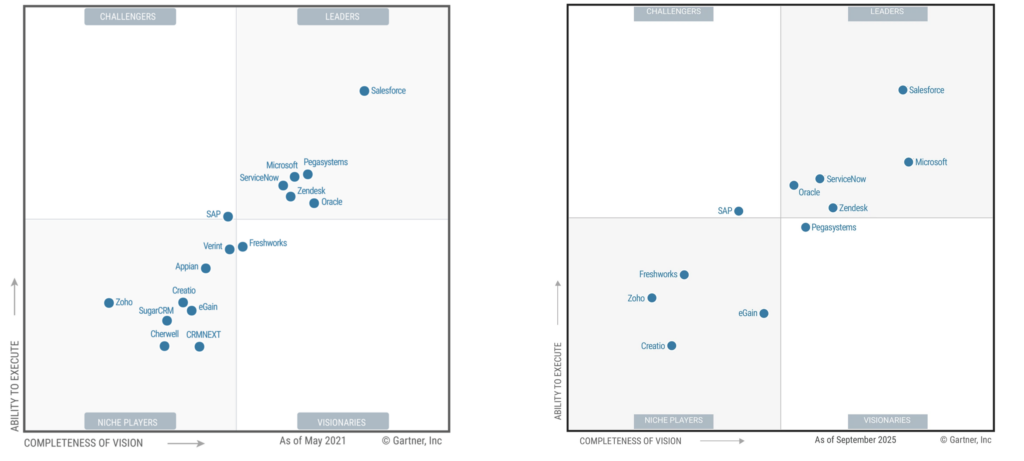
Before diving into the “why,” let’s establish where both platforms stand in the market. According to IDC’s 2025 Worldwide Semiannual Software Tracker, Salesforce leads the CRM market with 20.7% share and $21.6 billion in revenue (2024), while Microsoft holds the #2 position with $5.45 billion in revenue—though notably, Microsoft achieved higher growth at 11.5% year-over-year compared to Salesforce’s 9.5%. These revenue numbers show Salesforce’s dominant market position, but they don’t tell the complete story. What matters more than raw market share is how these platforms are positioned by independent analysts for their ability to execute and completeness of vision. According to Gartner’s Magic Quadrant for CRM Customer Engagement Center (October 2025, requires Gartner client access), both Microsoft and Salesforce are positioned as Leaders — the highest recognition in the quadrant.
While Oracle, ServiceNow, and Zendesk also hold Leader positions, the Magic Quadrant analysis makes clear that Salesforce and Microsoft are the two primary contenders driving innovation and market evolution in this space. The other Leaders maintain strong positions in specific segments or established customer bases, but when it comes to the strategic migration conversation, it’s fundamentally a choice between these two platforms — distinguished from Challengers (SAP), Visionaries (Pegasystems), and Niche Players (Creatio, eGain, Freshworks, Zoho).
What Makes Microsoft a Leader?
Gartner’s 2025 analysis highlights Microsoft’s positioning as a Leader based on three critical strengths that directly align with why organizations choose to migrate from Salesforce:
- Strategic AI: Microsoft’s AI strategy evolves customer engagement toward autonomous workflows, optimizing service experiences and marking a shift from assisted service to agentic AI-powered self-service models. Organizations benefit from opportunities to test novel AI capabilities as they’re deployed to the platform.
- Extensible Environment: The platform features a modular architecture built on the Microsoft Power Platform, supporting low-code and no-code development for UI and UX design, business logic, workflows, and data services. It offers open APIs, SDKs, support for the Model Context Protocol (MCP), and numerous marketplace applications for solution extension.
- Platform Ecosystem: Dynamics 365 benefits from deep integration with the broader Microsoft ecosystem, including Microsoft 365, Azure, and Power Platform. This approach streamlines operational processes and provides a consistent user experience, shared data, and seamless workflows.
The Real Differentiator
Microsoft hasn’t achieved Leader status by trying to out-feature Salesforce. Instead, Microsoft has built something fundamentally different — a platform where CRM (what we called XRM some times ago before Power Platform comes out) becomes a natural extension of how organizations already work, rather than a separate system requiring bridging and integration. That’s an advantage organizations should exploit.
Gartner notes that Microsoft’s CRM is “well-suited for organizations of any size, particularly those with existing investments in the company’s other enterprise software.” This isn’t just about convenience — it’s about a fundamentally different total cost of ownership equation and a different approach to enterprise architecture.
For enterprises already invested in Microsoft technologies, the question isn’t whether Dynamics 365 can match Salesforce feature-for-feature. The question is whether maintaining two parallel technology stacks (Microsoft for productivity, Salesforce for CRM) creates unnecessary complexity and cost when a more unified approach is available. This advantage becomes even more compelling when you consider the Power Platform for low-code development, the Azure ecosystem for enterprise services, and Microsoft’s AI capabilities through Copilot—all built on the same foundation rather than assembled through acquisitions.
A Balanced Perspective
While Microsoft’s AI capabilities through Copilot are compelling, the Copilot Credits consumption model for some features (or the storage topic) means costs can be adapted based on licensing obtained and usage patterns—especially important when data governance practices are established. Additionally, Microsoft doesn’t offer the same marketplace ecosystem as Salesforce—AppExchange has significantly more pre-built solutions, industry-specific apps, and third-party integrations than Microsoft Marketplace (formerly AppSource). This reflects different platform philosophies: Salesforce emphasizes packaged solutions and extensive partner ecosystems, while Microsoft focuses on component-based development through Power Platform. For organizations that prefer building customized solutions tailored to their specific needs, Microsoft’s approach can be advantageous. For those seeking ready-made industry templates and extensive out-of-box solutions, Salesforce’s marketplace maturity is a clear strength.
The Migration Trend
Here’s what I’ve learned from working on these migrations: organizations aren’t leaving Salesforce because it’s broken. The Salesforce instances I’ve encountered were delivering business value. Years of customization, extensive AppExchange integrations, business logic refined over time. Yes, some had accumulated significant technical debt—customizations upon customizations, sometimes implemented in ways that made maintenance challenging—but the systems were working. Sales teams were using them. Deals were closing. Business value was there, even if not always optimized.
So why migrate?
Salesforce is a Leader in the same Gartner Magic Quadrant as Microsoft, recognized for its AI platform, extensive partner ecosystem, and industry-specific products. This isn’t about Salesforce failing. It’s about strategy and costs.
What’s interesting is that Salesforce itself recognizes the shift toward unified platforms—their acquisitions of Tableau, Slack, MuleSoft, and others are direct responses to customer expectations for integrated ecosystems. These strategic purchases demonstrate that even Salesforce understands the market is moving toward comprehensive platform plays, not point solutions. However, building a unified platform through acquisitions is fundamentally different from having native integration from the ground up. What Microsoft has offered natively for years—tight integration between productivity tools, low-code platforms, analytics, and CRM on a single data foundation (Dataverse)—Salesforce is now assembling through purchased companies, each with their own technical architecture, data models, and integration patterns. Dynamics 365 applications store data within Dataverse, which serves as the foundation for Power Apps, Power Automate, and Power BI, enabling you to build and extend applications directly against your business data without requiring integration middleware.
The decision to migrate is strategic, not reactive. Companies aren’t running away from Salesforce; they’re moving toward better alignment with their broader technology investments. And the economics matter: when you’re already paying for Microsoft 365 E3/E5 licenses, Power Platform capabilities, and Azure infrastructure, the total cost of ownership equation changes dramatically. Organizations realize they’re essentially paying “twice” for overlapping functionality—collaboration tools, analytics, workflow automation, identity management—capabilities already included in their Microsoft stack.
The pattern I’ve seen consistently: organizations look at their future technology architecture, recognize they need tighter integration with Azure services, Power Platform investments, and Microsoft 365 productivity tools, and run the TCO numbers. When they factor in what they’re already paying Microsoft versus what Salesforce would cost to maintain and expand, the strategic value of a unified platform approach, combined with better economics, outweighs the comfort of staying with a known, functional system.
Why Dynamics 365? The Strategic Advantages
We’ve established that migration decisions are strategic, driven by organizations seeking better alignment with their existing Microsoft investments. But what specifically does Dynamics 365 deliver that justifies such a significant transformation?
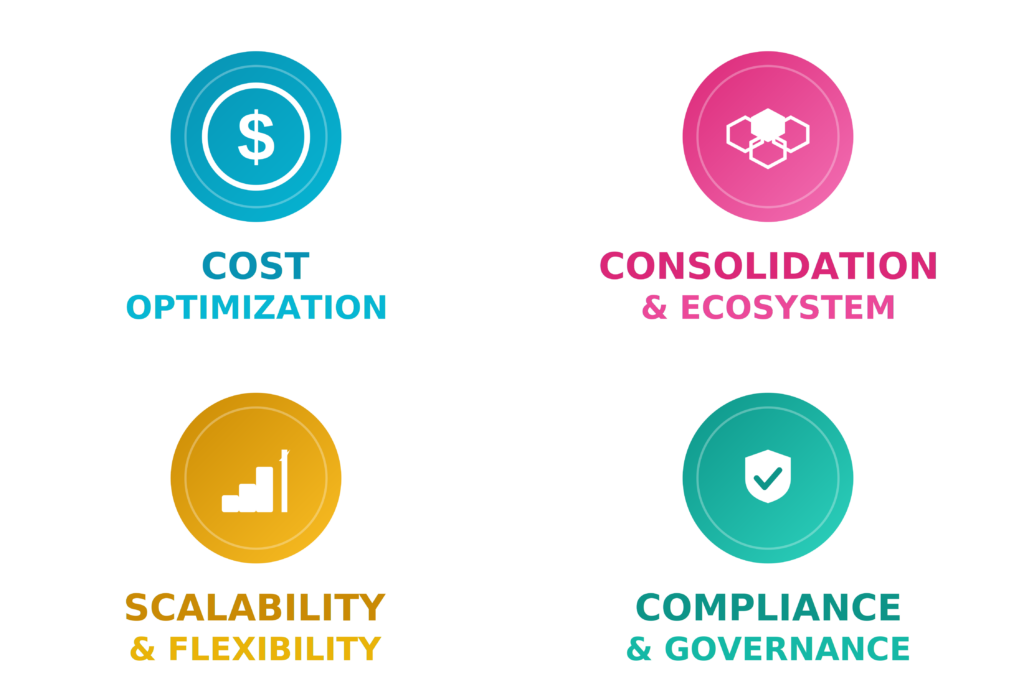
The primary driver is cost optimization. Dynamics 365 licensing is fundamentally less expensive than Salesforce. While Dynamics 365 still requires additional licenses beyond your Microsoft 365 subscription, the per-user costs are significantly lower than comparable Salesforce tiers. Beyond cost, three additional strategic factors reinforce the migration decision: consolidation & ecosystem (unified platform with Microsoft 365, Power Platform, and Azure), scalability & flexibility (adaptable architecture for growing organizations), and compliance & governance (unified security and regulatory alignment).
Cost Optimization & Licensing Models
One of the first conversations in any migration evaluation centers on cost. While initial implementation costs for migration can be significant, the total cost of ownership calculation often favors Dynamics 365 for organizations already invested in Microsoft technologies.
Salesforce’s licensing model can become complex and expensive as organizations scale. Dynamics 365 approaches licensing differently. The platform leverages existing Microsoft investments. If your organization already has E3 or E5 licenses, you’re getting capabilities that would require additional purchases in Salesforce. Power Platform capabilities (Power Apps, Power Automate, Power BI) are included or available at marginal costs. Azure consumption-based pricing allows you to scale integration infrastructure without per-user licensing considerations.
But the real cost advantage isn’t just in licensing — it’s in avoiding redundant spending. When you’re already paying for Microsoft 365 E3 or E5 licenses, you have capabilities that require separate Salesforce purchases: collaboration tools (Teams vs. Slack), workflow automation (Power Automate vs. additional Flow licenses), and analytics (Power BI vs. Tableau). Organizations realize they’re essentially paying twice for overlapping functionality—once to Microsoft, once to Salesforce—which fundamentally changes the total cost of ownership equation.
Beyond direct licensing costs, vendor consolidation simplifies contract management and often leads to better pricing. Organizations can negotiate enterprise agreements that span Microsoft 365, Azure, Power Platform, and Dynamics 365 under a single contract, reducing administrative overhead and leveraging volume commitments for better rates. Managing one vendor relationship with unified support, billing, and renewal cycles is operationally simpler and can reduce the overall technology spend.
The Ecosystem Advantage – The Microsoft Boost
This is where Dynamics 365 truly differentiates itself. It’s not just about the CRM application; it’s about what becomes possible when your CRM is a native part of a broader platform ecosystem.
Native Integration with Microsoft 365
In Salesforce, Microsoft 365 integration requires connectors, third-party tools, or custom development. With Dynamics 365, the integration is native and seamless. Your sellers work in Outlook, and CRM data is contextually available in the side panel. Meeting notes in Teams automatically relate to opportunity records. Excel becomes a natural interface for bulk data operations. SharePoint document management integrates natively, though enterprise scenarios requiring security model synchronization need additional configuration.
This isn’t just convenience; it changes how people work. With Dynamics 365, server-side sync with Exchange is straightforward—no third-party sync agents, and most organizations have it running within minutes.
The difference is architectural. Microsoft 365 and Dynamics 365 share the same identity system (Azure AD / Entra ID), the same security concept, and often the same data platform (Dataverse). This deep integration isn’t something you can replicate with APIs and connectors — it’s fundamental to how the platforms were built.
Power Platform Synergy
Salesforce has a powerful ecosystem with AppExchange, but extending Salesforce requires proprietary development skills—Apex code, Lightning components, and Visualforce are Salesforce-specific technologies. Even experienced developers need to learn these proprietary frameworks from scratch, and the talent pool with Apex expertise is limited and specialized. (Pro-code development is common in Dynamics 365 too, but the difference is the underlying technology stack: C#, .NET, TypeScript, and Azure services are industry-standard skills that developers often already possess or can transfer from other projects.)
Power Platform has accelerated this shift. Many organizations already have Power Platform licenses included in their Microsoft 365 subscriptions, and with the widespread deployment of Microsoft 365 Copilot, organizations are establishing Centers of Excellence to drive low-code innovation across their enterprises. Power Platform originated from Dynamics 365—they share the same technical foundation built on Dataverse. Organizations investing in Power Platform are essentially already running on the Dynamics 365 technical stack.
With Power Apps, business analysts can build custom applications that extend CRM functionality without traditional development. Organizations build field service applications, custom approval workflows, and mobile data collection tools using Power Apps, integrated with Dynamics 365 data. Power Automate provides workflow automation with over 1,000 pre-built connectors. Creating custom connectors is straightforward. Power BI is Microsoft’s analytics standard across the entire ecosystem, and it embeds easily into Dynamics 365—directly in CRM forms or organization-wide. Sure, Salesforce’s out-of-the-box dashboards are more powerful by default, but Power BI has become very ubiquitous. CRM data flows directly into Power BI, the semantic layer in Dataverse ensures consistency, and organizations consolidate on one analytics platform instead of maintaining separate BI tools for CRM data. For organizations already working with Microsoft Fabric, the integration goes even further—Virtual Tables enable data integration without replication, connecting external data sources directly into Dataverse for real-time analytics across your entire data estate.
Azure Services Integration
If your organization is using Azure (and most enterprises are), Dynamics 365 becomes part of a larger platform architecture rather than a standalone system requiring extensive integration work.
Microsoft Entra ID (formerly Azure AD) serves as the central identity provider across the entire ecosystem. Single sign-on, multi-factor authentication, conditional access policies, and user provisioning are managed from one directory service. Organizations don’t maintain separate identity systems or LDAP directories for CRM—Entra ID handles authentication and authorization uniformly across Microsoft 365, Azure, and Dynamics 365.
Your CRM data can flow into Azure Data Lake for advanced analytics through Synapse Link or Fabric. API Management provides enterprise-grade governance for integrations. Azure Application Insights delivers telemetry and monitoring for custom applications and plugins.
In enterprise migrations, Dynamics 365 integrates with ERP systems like SAP using Azure Service Bus, document generation runs on Azure Functions etc. Authentication uses managed identities, eliminating separate credential management. Networking and data movement operate within a single cloud platform. Enterprise governance tools like Microsoft Purview and Sentinel plug into the ecosystem, extending data governance and security monitoring across all connected systems.
The architectural advantage compounds over time—shared identity, consistent security models, and Azure-native services reduce the ongoing effort of maintaining integrations as platforms evolve.
Scalability & Flexibility
Dynamics 365’s cloud-native architecture, running on Azure infrastructure, enables organizations to scale from departmental pilots to global enterprise deployments. The platform supports substantial scale—I’ve deployed implementations with over 8,000 concurrent users, and enterprise deployments with more than 20,000 seats are running reliably in production (even on the same environment).
The modular architecture allows incremental expansion. Organizations start with Sales, add Customer Service or Field Service as needs evolve, with each module integrating seamlessly through the shared Dataverse platform (defining your Data Model and Security Model is a key topic there).
Organizations implement feature flags for controlled rollouts, configure country-specific business logic for regional compliance, and maintain process variations within a single instance. Power Platform serves as the development engine—when out-of-box features don’t meet specific needs, you build tailored solutions that integrate natively with the core platform. The flexibility to extend without being locked into standard capabilities accelerates development and adaptation to changing business requirements.
Unified Platform Vision
One of the most compelling strategic advantages of Dynamics 365 is the unified platform approach. Salesforce grew through acquisition, and while they’ve done impressive work integrating their various clouds (Sales Cloud, Service Cloud, Marketing Cloud), you still feel the seams. Different data models, different UIs, different admin experiences.
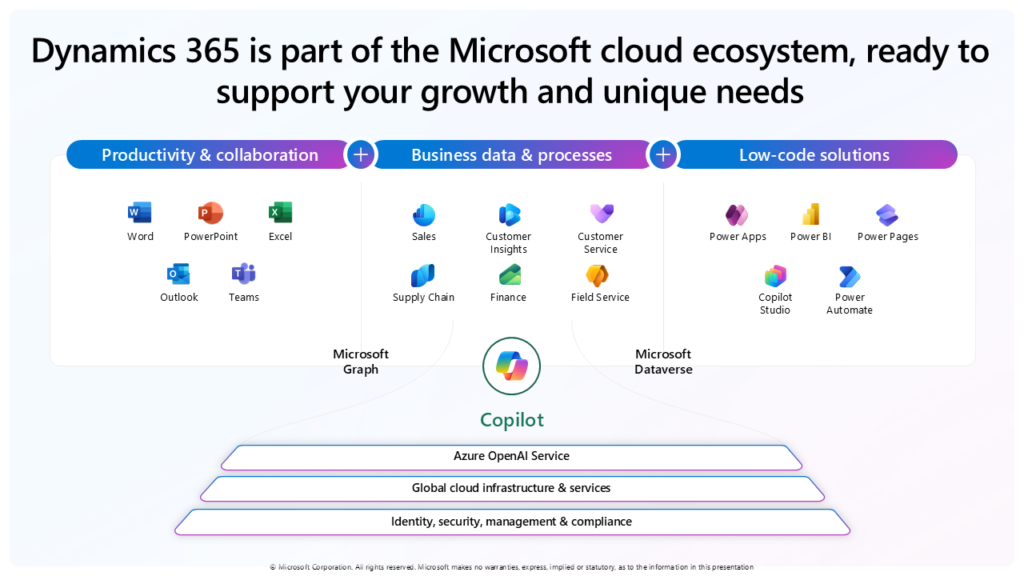
Dynamics 365 provides a single platform (Dataverse) that serves as the foundation for Sales, Customer Service, Field Service, Marketing, and custom applications. Whether you’re extending the Sales CRM, building a custom Power App, or creating a Copilot Studio project, you’re using the same technology stack—the same data modeling tools, the same security framework, the same customization components. Power Automate workflows extend Teams the same way they extend Dynamics 365. A table created for a custom Power App uses the same structure as tables in your Sales module. The development approach is consistent whether you’re working on Microsoft’s first-party apps or building your own solutions.
The practical impact is in how teams build solutions. Organizations develop consistent habits and patterns—the same mental model applies whether you’re creating a field service mobile app, extending your sales process, or building a custom departmental solution. This consistency democratizes application development, best practices and architecture alignment/patterns. A business analyst who learned to build a Power App for HR can apply those same skills to extend the CRM. A developer who created workflows for marketing automation uses the same patterns for field service operations. Your organization builds institutional knowledge around one platform approach, not separate expertise for each application.
The administrative efficiency is equally important. One admin portal (Power Platform admin center), one security model, one set of customization tools. IT teams don’t need to become experts in multiple platforms with different approaches to common tasks. Whether managing users, configuring security, or deploying solutions, the approach is consistent. Solution components—entities, forms, workflows, plugins—follow the same patterns across all Dynamics 365 modules.
Compliance & Governance
For enterprises with regulatory requirements, audit obligations, or complex security policies, Dynamics 365’s approach to compliance and governance offers significant advantages over maintaining separate CRM ecosystems.
Unified Security Model
As covered in the Azure Services Integration section, Dynamics 365 leverages Microsoft Entra ID for centralized identity management across the entire ecosystem. This unified approach means your security teams manage CRM access using the same patterns, tools, and policies they apply to Microsoft 365 and Azure—reducing security complexity and audit overhead.
Comprehensive Compliance Certifications
According to Microsoft’s official compliance documentation, Dynamics 365 holds extensive certifications including ISO 27001, ISO 27017, ISO 27018, ISO 27701, ISO 9001, SOC 1 Type 2, SOC 2 Type 2, SOC 3, HIPAA/HITECH, and GDPR compliance. For organizations in regulated industries—healthcare, finance, government—CRM data benefits from the same compliance controls as other Azure services. Data residency requirements are addressed through Azure’s regional data centers, ensuring data sovereignty compliance for various jurisdictions.
Audit logging, retention policies, and e-discovery capabilities follow Microsoft 365 patterns that compliance teams already understand. Organizations don’t need separate compliance programs for CRM versus other business applications—the framework is unified.
Release Management & Infrastructure as Code
If your organization uses Azure DevOps or GitHub Enterprise for CI/CD, those same pipelines can manage CRM deployments. Power Platform build tools integrate with your existing processes. Version control, release management, and deployment automation follow patterns your teams already know. Organizations can now use Terraform to provision and manage Power Platform and Dynamics 365 environments, bringing Infrastructure as Code (IaC) capabilities to business application platforms—a capability enterprise architects have long wanted for CRM systems.
This alignment simplifies governance significantly. Change advisory boards review CRM changes using the same processes as other systems. Audit trails for configuration changes follow established patterns. Rollback procedures leverage familiar DevOps practices. Configuration as code, automated testing, and controlled deployments use the same tooling as other enterprise applications.
Administrative Efficiency
One admin portal, one security model, one governance framework. Organizations already managing Microsoft 365, Azure, and Power Platform don’t need to train administrators on an entirely separate system. The skills, processes, and tools IT teams already use apply directly to Dynamics 365. This reduces training costs, minimizes administrative errors, and accelerates time-to-competency for new team members.
For organizations with complex compliance requirements, this consistency isn’t just convenient—it’s a strategic advantage that reduces risk and administrative burden while ensuring regulatory adherence across the entire technology stack.
Innovation & AI Capabilities
Microsoft’s strategic partnership with OpenAI positions Dynamics 365 at the center of their enterprise AI ecosystem, with Azure OpenAI Services powering intelligent capabilities across the platform. What makes this compelling isn’t just the AI features themselves—it’s the extensibility.
As I documented in my Extending Copilot for Sales with Copilot Studio post, you can extend Copilot with custom data sources and business logic through Copilot Studio. The ability to connect your ERP, ITSM system, or data lake directly into the Copilot experience means the AI isn’t limited to CRM data—it has access to your complete business context. You can pull contract status from your ERP, summarize support tickets from your ITSM system, or analyze trends from your data lake—all accessible through natural language.
Copilot has changed how people interact with the CRM. Sales teams, customer service agents, and field workers no longer navigate through screens and forms—they ask questions in natural language: “What’s the status of opportunities closing this quarter?” “Summarize this customer’s recent support cases.” “Show me today’s service appointments with parts availability.” The system understands context, leverages data from CRM, Microsoft Graph (emails, chats, documents, meetings), and Microsoft 365 apps, and provides intelligent responses.
For enterprises racing to deploy AI capabilities, when you choose Dynamics 365, you’re not just selecting a CRM—you’re positioning your organization to leverage Microsoft’s entire AI ecosystem with native integration. The innovation roadmap matters here: Microsoft’s investments in Azure OpenAI, Microsoft 365 Copilot, and Power Platform are all feeding into Dynamics 365 capabilities.
Conclusion
The decision to migrate from Salesforce to Dynamics 365 isn’t about one platform being “better”—it’s about strategic alignment with your existing Microsoft investments.
For organizations already running Microsoft 365, Azure, and Power Platform, the business case comes down to economics and architecture: eliminating redundant spending on overlapping capabilities, leveraging native integration instead of bridged connections, and positioning for AI-driven transformation within an ecosystem you already own.
Both platforms are Gartner-recognized Leaders. The question is whether maintaining separate CRM infrastructure makes strategic sense when you could have deep, native integration across productivity, analytics, development, and AI on a unified platform. As AI becomes the primary competitive differentiator, Microsoft’s approach through Copilot, prebuilt agents embedded in Dynamics 365 applications, and extensibility via Copilot Studio delivers immediate value—powered by the Azure OpenAI partnership with native ecosystem integration that separate platforms can’t match without additional bridging work.
But understanding the “why” is only the first step. The strategic advantages mean nothing without proper planning and execution. In the next parts of this series, we’ll dive into migration approaches, key topics you must address upfront, and the prerequisites that determine whether your migration succeeds or stumbles. The approach you choose—and how well you prepare—will shape everything that follows.
If you found this helpful, I’d love to hear about your experiences or questions. Drop a comment below or connect with me on LinkedIn to continue the conversation.




Leave a Reply